
Decloaking phishing, part 1: fake CAPTCHA gates
November 17th 2026
Why a gate
A phishing page has two audiences it cannot tell apart from the URL: the victim who clicked the link, and whatever scanned the link before or after them. A kit that shows the lure to everyone gets caught by every mail filter, link sandbox and blocklist crawler that fetches it.
The gate is the cheapest way to split those audiences. The victim sees a familiar "verify you are human" step and does what they have been trained to do. A scanner that does not click sees a verification page, an ordinary thing for a website to show, and reports exactly that. The lure loads only after the click.
Kit-built or vendor widget
Most gates we meet are drawn by the kit itself, imitating the shape of a vendor widget with no vendor behind them. A few are genuine third-party widgets, Google's reCAPTCHA, Cloudflare's Turnstile or hCaptcha, that the attacker has put in front of the lure: a legitimate product doing its job for an illegitimate customer. They look alike at a glance.
In a screenshot, a kit-built gate usually gives itself away in one of three ways:
- The control is the whole page. A real site wraps its widget in a header, a footer, a reason for the check. A kit gate is a single card on an empty page, often with no favicon and no site name.
- The privacy footer is wrong or missing. Vendor widgets carry a small "Privacy · Terms" pair that links to the vendor. Kit gates omit it, draw it as text that links nowhere, or pad the card with policy prose nobody would put on a real check.
- The shape is one no vendor ships. Press-and-hold buttons, arithmetic questions, five coloured letters in a box and a plain "Verify" button are kit shapes. Vendor widgets are a checkbox, an invisible check with a small badge, or a puzzle grid when the vendor escalates.
The visible challenge is often only the last step. Before showing it, many kits already look at the browser fingerprint, the visitor's IP address and how the mouse moves, and decide whether the visitor is a person or a scanner. A visitor who fails that test is not told so. It gets a decoy instead of the lure: a fake error page, a blank page, or a redirect to the real brand's own website, so the host looks clean to whoever is checking.
A genuine vendor widget looks like the vendor's widget because it is one. Its presence says nothing about the page behind it either way, which is the point we come back to below.
What is behind the gates
Three pairs from the last three weeks: the page as served, and what was behind it. Hostnames are defanged; each receipt links to the public scan.
A kit-built fake checkbox, in front of a Meta appeal lure
A fleet of pages on a free hosting platform, each named after Meta with a few random characters. The page served is a drawn copy of Google's reCAPTCHA Enterprise checkbox, with Meta's logo and paragraphs borrowed from a real privacy notice. Nothing loads from any vendor; the box is HTML the kit draws, and the click is the whole test.
Behind it, a Meta "Privacy Centre" page announcing that the visitor's page is scheduled for deletion and offering an appeal form, which is where the credentials go.
https://metafca.vercel[.]app/privacy-center
Scanned November 16, 2026 · 10:19 UTC · View the scan
Why
- Meta's name and branding on a page the brand does not operate
- Hosted on a free application platform under a throwaway subdomain
- Asks for account access on the pretext of an appeal
This one fleet ran to dozens of hostnames that week, every one behind the same drawn checkbox.
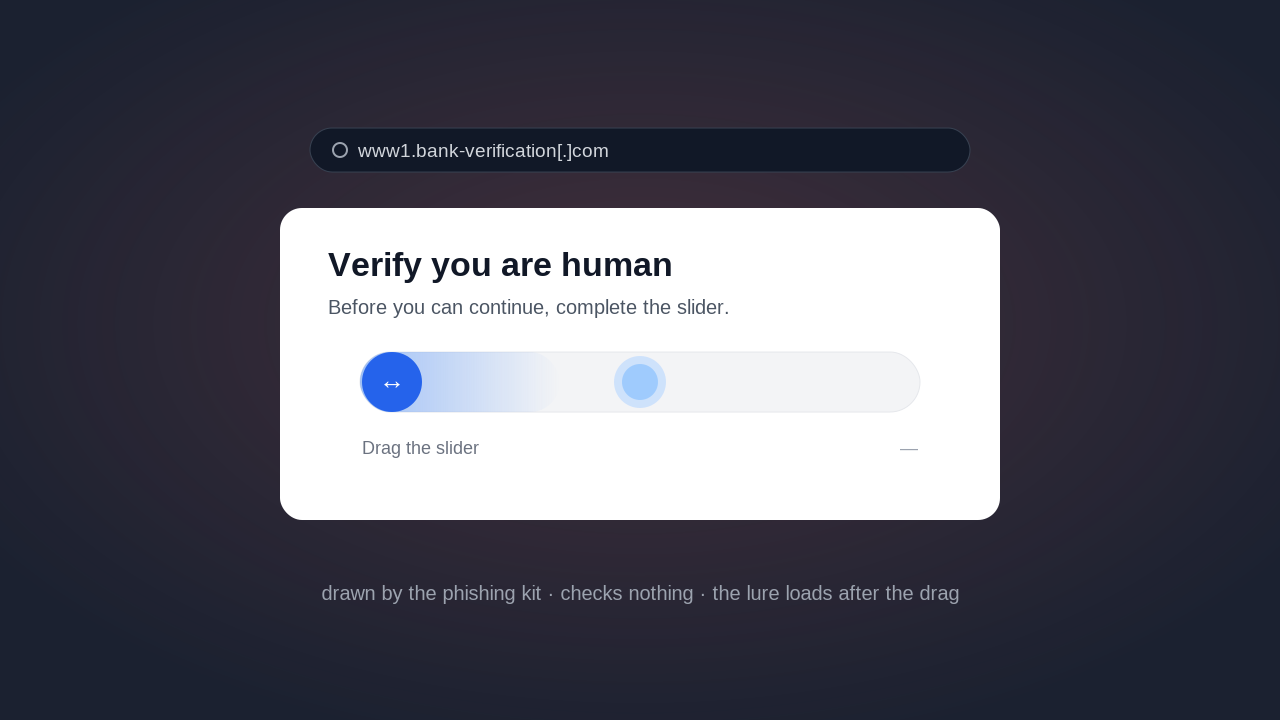
A kit-built slider, in front of a bank login
A single host with a Canadian bank's name in it. The page served is a card headed "Verify you are human" with a slider to drag, on an otherwise empty page. Under the card, in grey, a paragraph forbids AI crawlers from reading the site. The first time we scanned it, in late October, the slider was all we saw and the verdict was neutral.
Behind the slider, the bank's sign-in page, card number and password, on a domain the bank does not operate.
https://www1.bmo-verification[.]com/signin
Scanned November 7, 2026 · 19:49 UTC · View the scan
Why
- Domain is not operated by BMO
- TLS certificate has no organization information
- Domain not registered through BMO's usual registrar
- Domain was registered very recently
A real vendor widget, in front of a document-sharing lure
A page on a throwaway host, with Microsoft Teams marketing art as the backdrop. The gate is a genuine Cloudflare Turnstile widget in a plain card. Nothing about it is fake. It is a real product doing what it was built to do.
Behind it, a SharePoint "a document has been shared with you" card. It shows the visitor a code and tells them to enter it on Microsoft's real device-login page. The code belongs to the attacker's session: whoever enters it signs the attacker in to their own account. No password is ever typed on the phishing page.
https://www.ttldocs[.]online/
Scanned November 13, 2026 · 19:44 UTC · View the scan
Why
- SharePoint's name and branding on a domain Microsoft does not operate
- Hands the visitor a sign-in code to enter on the real Microsoft device-login page
- No document behind the "Open Document" button
This is the pair we expected not to find. More on that in the numbers.
The numbers
Since mid-October every browser scan records whether it met a gate, what kind, whether the gate opened and what the verdict on the page behind was. The figures below are from our own discovery lane, pages found from Certificate Transparency logs as described on the feed page, for the week of November 9th to 15th, 2026 (UTC), counted by distinct host.
- Kit-built gates: 848 hosts. The gate opened on 83% of them (706). A phishing or suspicious page sat behind 22% of all kit-gated hosts (187), one in four of the ones that opened.
- Genuine vendor widgets: 593 hosts. We reached the page behind 50% of them (298). A positive sat behind 1% (8). A verification widget on an ordinary website is the normal case, and this lane is mostly ordinary websites.
- All positives: 2,874 hosts. 195 of them, 7%, were positives only because one of those gates was opened first. Stop at the gate and those are 195 clean verification pages.
Behind the opened gates we found credential forms, paste-and-run ("ClickFix") malware lures and persuasion pages of the appeal and fee-and-prize kind, dressed mostly as Google, Meta, Binance, WhatsApp and Microsoft.
On the vendor widgets. The chart undersells them: that lane is mostly ordinary websites with ordinary widgets. Since October 8th we have found 156 positives on 127 hosts behind genuine vendor widgets, most of them Cloudflare's Turnstile: document-sharing lures, parcel-fee pages, a Spotify family. A real widget does not make a page safe. It only keeps scanners from reading it, so nobody checks what is behind.
What this means if you triage links
- A verification page is not a verdict. If your sandbox, link scanner or screenshot tool shows a gate, the only honest result is "not assessed". Treat "clean" on a gated URL as "clean as far as the gate".
- A real vendor widget is not a reassurance. It is a legitimate product in front of whatever the operator chose to put behind it.
- Expect the decoy. "The site is down" from a scanner, on a URL a user swears they just saw a login on, is consistent with a decoy. Reproduce in an ordinary browser before closing the ticket.
Discussion
The gate works because it is honest. A kit gate really is a verification page and a vendor widget really is a vendor widget, so a scanner that reports what it is shown is not wrong. It is answering a question about the wrong page. The only way to answer the right one is to treat the gate as a step rather than a destination, and score the page the victim ends up on.
That is why the vendor-widget result matters more than the kit counts. Kit gates keep changing shape. A genuine widget does not change, costs the attacker nothing, and is designed to be good at exactly the thing a scanner needs it not to be good at. Part 2 looks at what happens after the gate: decoys, redirects to a clean page, and gates that refuse whole browser families.